The content is credited from here
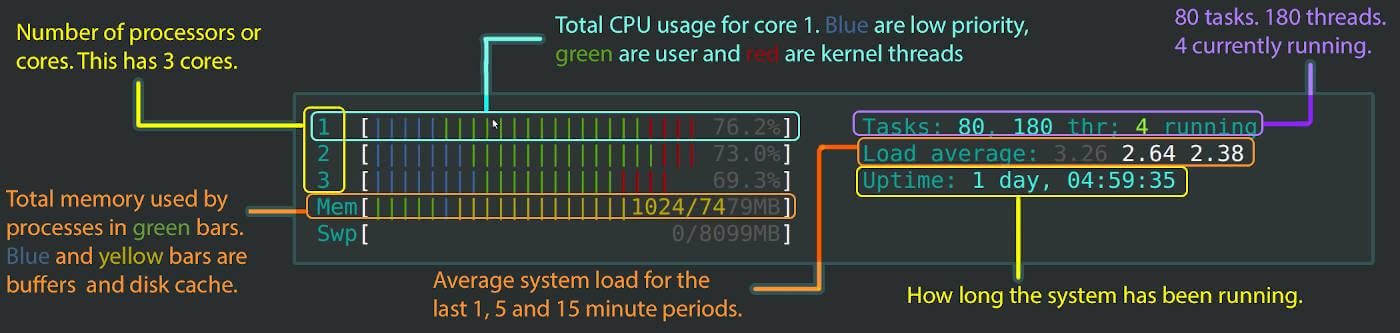
Let’s start with the upper section.
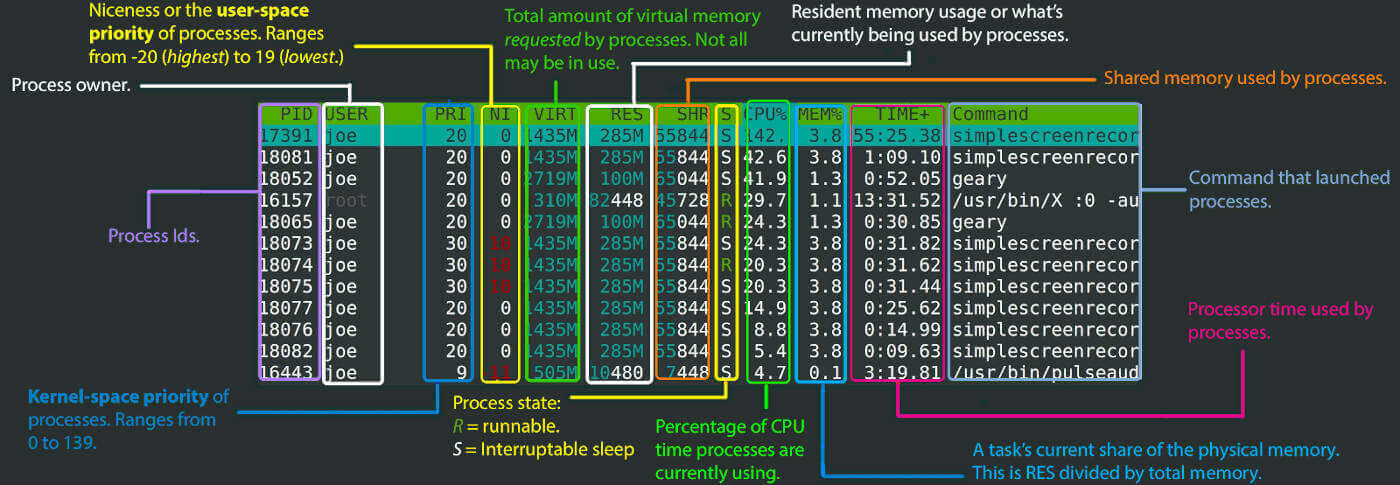
Here’s the lower section of htop.
Wednesday, November 29, 2023
Saturday, December 16, 2023
The content is credited from here
Let’s start with the upper section.
Here’s the lower section of htop.
---
title: "Visual the usage of CPU and memory with htop"
date: 2023-11-29
date-modified: last-modified
categories:
- linux
image: htop.jpg
description: htop is an interactive process viewer and system monitor.
---
```{r setup, include=FALSE}
knitr::opts_chunk$set(
# fig.width = 6,
# fig.height = 3.8,
fig.align = "center",
# fig.retina = 3,
out.width = "100%",
warning = FALSE,
# evaluate = FALSE,
collapse = TRUE
)
```
The content is credited from [here](https://codeahoy.com/2017/01/20/hhtop-explained-visually/)
Let’s start with the upper section.

Here’s the lower section of htop.
